Kiosk Peripherals 101: Printers, Scanners, NFC, Cameras and Cash Modules
By MHY Engineering Team · Updated · 12 min read
A kiosk quotation lists a stack of peripherals — printer, scanner, NFC, camera — that can look interchangeable on paper but serve very different jobs. Specifying more modules than your use case needs adds cost and cabinet complexity for no benefit; specifying too few sends the project back to industrial design after the software team discovers a missing capability. This guide walks through what each peripheral actually does, how it connects, and which use cases genuinely need it. Browse our self-service kiosk and payment terminal lines alongside it.
1. Thermal printers
An 80mm thermal printer is the standard choice for order tickets, purchase receipts and kitchen dockets — it needs no ink or ribbon, just heat-sensitive paper, which keeps running costs low and maintenance simple. Compact kiosks or applications needing only a short slip (parking tickets, small vouchers) sometimes use a narrower 58mm printer to save cabinet space. Specify a printer with an auto-cutter (clean separation between receipts) and a near-end paper sensor that flags a low roll before it runs out mid-transaction — a small detail that prevents a steady stream of support calls once a fleet is in the field. If your workflow ends in an emailed or SMS receipt instead of a paper one, the printer can be omitted entirely to save cost and depth.
2. Barcode and QR scanners
A 1D/2D scanner reads traditional barcodes (1D) and QR codes (2D) — used for loyalty card scans, printed coupons, product barcodes at self-checkout, and mobile payment or ticket QR codes shown on a customer's phone screen. Even kiosks that only accept card payment often still include a scanner for loyalty and coupon redemption, since it is a low-cost module relative to the customer-experience gain. Retail self-checkout applications need a scanner (or scanner/scale combination) capable of reading barcodes on physical goods at various angles and distances — a materially different requirement from reading a single QR code held up to the screen.
3. Card and ID readers: NFC, IC, MSR, RFID
This category covers several distinct technologies that are easy to conflate on a spec sheet:
- ✓ NFC / contactless — reads tap-to-pay bank cards and mobile wallets (Apple Pay, Google Pay); the default for modern card payment.
- ✓ IC chip reader — reads insert-style chip cards, still required in markets where chip-and-PIN remains common.
- ✓ Magnetic stripe reader (MSR) — swipe cards, increasingly legacy but still specified for older card-present infrastructure in some regions.
- ✓ RFID reader — reads contactless ID cards, e-passport chips (per ICAO 9303) or hotel key cards; a different frequency and protocol from payment NFC, used in identity and access applications rather than payment.
Payment terminals typically bundle NFC, IC and sometimes MSR into a single certified payment module — see our dual-screen POS for an example with IC/ID induction built in. Identity and hospitality applications instead pair an RFID reader with our passport reader line for full document and chip verification.
4. Cameras and biometric modules
A camera on a kiosk can serve several distinct purposes, so define which one you actually need: a binocular (dual-lens) camera supports face-recognition login or age-verification snapshots; a simple webcam-grade camera supports remote video assistance or basic photo capture; and a dedicated fingerprint module adds biometric verification for higher-security identity workflows, as seen on our smart full-page passport reader, which includes a marked capture zone for an optional fingerprint sensor. Face-recognition and fingerprint modules both require backend software to do the actual matching — the kiosk hardware captures the image or print, but your integrator's application (or a cloud service) performs the identity match.
5. Cash acceptance and dispensing modules
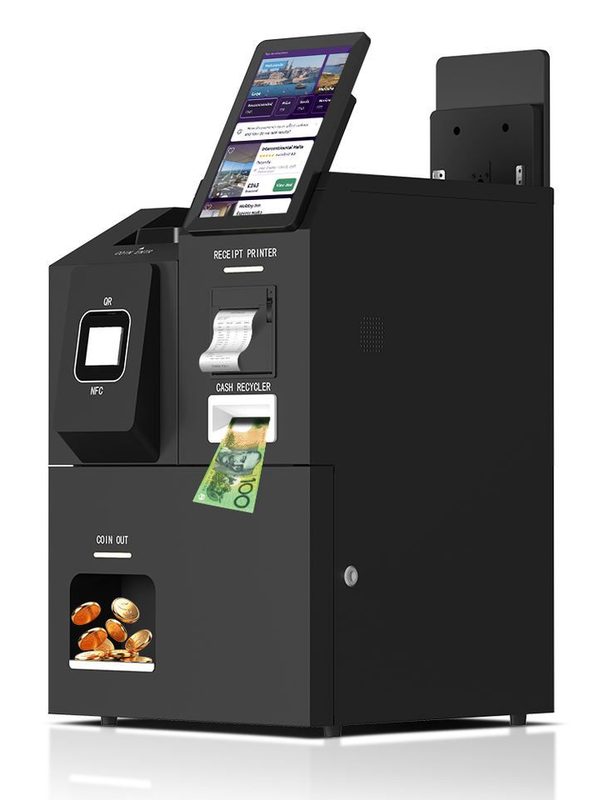
Cash-handling hardware is the most expensive and space-hungry peripheral category, so specify it only where cash is a genuine, not hypothetical, payment method for your market. A banknote acceptor validates and stores inserted bills; a banknote recycler goes further, reissuing accepted notes as change for later customers rather than needing constant manual refilling; a coin dispenser handles the remainder that doesn't divide evenly into note denominations. Our cash recycling payment kiosk combines all three with QR/NFC digital payment in one unattended cabinet — a useful reference point for what a full cash-capable build actually requires in cabinet depth and lockable service access.
6. How peripherals actually connect
USB is the default interface for nearly every modern kiosk peripheral — printers, scanners, card readers and cameras — because it is simple to wire, hot-swappable for service, and has broad SDK and driver support across Android, Windows and Linux. RS232 (serial) still appears on some cash-handling hardware, older certified payment terminals and industrial sensors; if a peripheral you need only ships with RS232, confirm your motherboard has the port (or a USB-to-serial adapter is acceptable) before finalizing the design. Ethernet occasionally appears for standalone card readers or networked cash devices that need to report status independently of the main kiosk computer.
7. Peripheral sets by use case
| Use case | Typical peripheral set |
|---|---|
| QSR self-order | 80mm printer, NFC + QR scanner, optional camera for loyalty |
| Retail self-checkout | 1D/2D scanner (or scanner/scale), NFC + IC payment, printer, anti-theft sensor |
| Hotel self check-in | Passport/ID reader (RFID + OCR), printer, key-card issuing module, camera |
| Unattended bill payment | QR/NFC scanner, banknote acceptor/recycler, coin dispenser, printer |
| Identity verification kiosk | Full-page passport reader, RFID, optional fingerprint module, camera |
| Industrial HMI panel | Typically none of the above — RS-232/485 and digital I/O to plant equipment instead |
8. Frequently asked questions
Does every kiosk need a receipt printer?
USB or RS232 — which connection should I specify for peripherals?
What is the difference between a QR scanner and an NFC reader?
Do I need a cash-accepting module on my kiosk?
What should I ask a manufacturer about peripheral integration before ordering?
Not sure which modules your project needs?
Describe your use case and target market — our engineers will recommend the right peripheral set and confirm SDK support within 24 hours.